How to add friends in Wuthering Waves
What’s better than a game you can play for free? A game you can play for free with your buddies, of course.

Image credit:Kuro Game

Even though it’s primarily a single-player game, Wuthering Waves allows you to connect with other players in your account’s friends list, which ought to make it much easier to come up with teams of three for playing in co-op mode.
Adding friends in WuWa is nice and straightforward, but if you have any burning questions, read on below to learn all about the Wuthering Waves friends feature.
How to add friends in Wuthering Waves
Open your Terminal, a.k.a. the game menu, either by pressing Esc. on PC or by clicking/tapping the starburst icon in the upper right-hand corner of the screen.
The Friends sub-menu is labelled as such, and accompanied by an icon of two clasped hands.
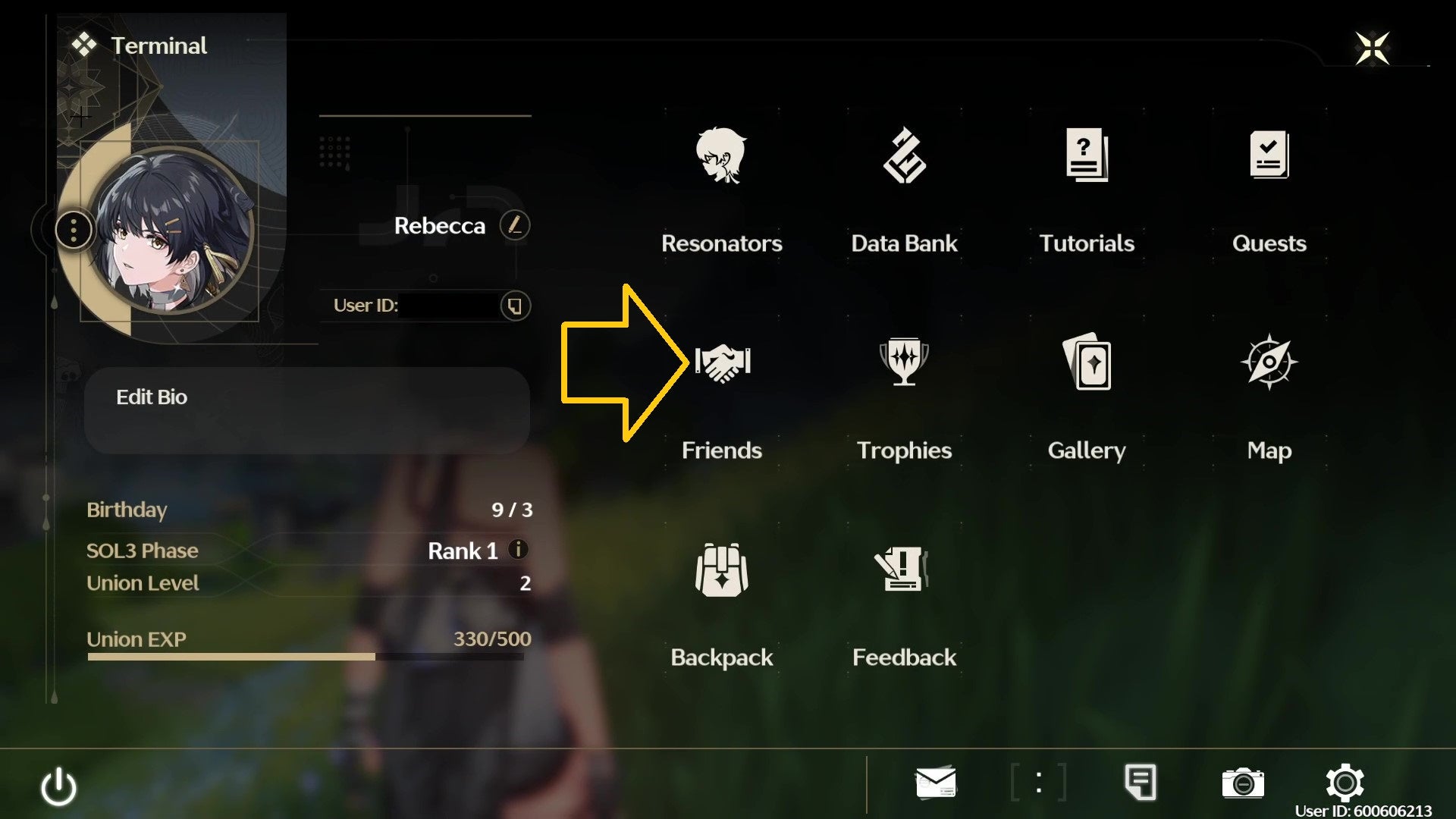
You can probably find it, but I like drawing arrows. |Image credit:VG247 / Kuro Games
From here you can select from three tabs down the left-hand side of the screen to view your existing friends list, accept or reject friends requests, and view a list of players you’ve recently met in co-op.
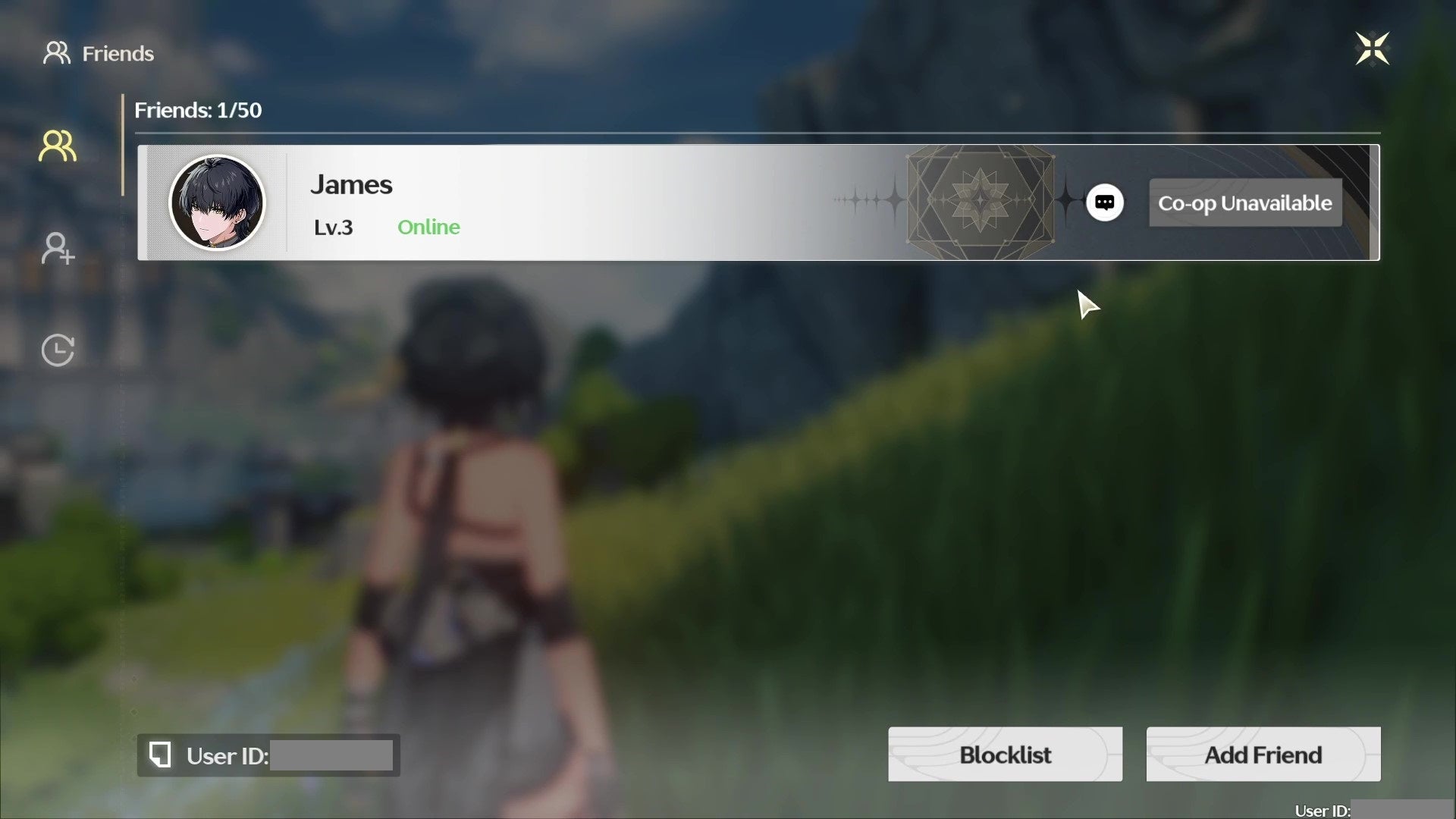
Two figures standing together is your friend list; a lone figure with a plus sign indicates your friend requests; and the clock timer is where you can view your recent co-op buddies. |Image credit:VG247 / Kuro Games
To find a friend to add, you need to know their user ID. Then all you need to do is click the “Add Friend” button at the bottom of your friend list, paste in their UID, and you should see their profile pop up straight away. You can then send them a friend request.
<img loading=“lazy” src=“https://assetsio.gnwcdn.com/wuthering-waves-find-friends-edited.jpg?width=2048&height=2048&fit=bounds&quality=85&format=jpg&auto=webp" onerror=“this.onerror=null;this.src=‘https://blogger.googleusercontent.com/img/a/AVvXsEhe7F7TRXHtjiKvHb5vS7DmnxvpHiDyoYyYvm1nHB3Qp2_w3BnM6A2eq4v7FYxCC9bfZt3a9vIMtAYEKUiaDQbHMg-ViyGmRIj39MLp0bGFfgfYw1Dc9q_H-T0wiTm3l0Uq42dETrN9eC8aGJ9_IORZsxST1AcLR7np1koOfcc7tnHa4S8Mwz_xD9d0=s16000';" alt=“The “find friend” pop-up in Wuthering Waves, complete with text box and found friend. - 5”>
Guides Editor James and I managed to slightly ruin this screenshot by sending each other friend requests at the exact same moment, but you get the idea. |Image credit:VG247 / Kuro Games
You can also share your own user ID with another player by copy-pasting it using the handy button on your profile page. That way, they can add you as a friend! To accept friend requests, you just need to press the check-mark icon next to their username (or press the cross icon if you receive a friend request you want to reject).
Who can I add as a friend in Wuthering Waves?
There are a couple of restrictions attached to your Wuthering Waves friend list — although happily, you can add friends just about as soon as you get access to your Terminal, without the need to go levelling up a few times before you can say hi to your buddies.
First, you’re limited to 50 friends at any one time — and with 3 million pre-registered players, there’s a non-zero chance you might actually know that many people who play! So you’re going to have to be selective if you want to ensure that your besties make the cut.
Secondly, at the time of writing, you’re limited to only befriending players in your own server region. WuWa currently has five regions: America, Asia, Europe, HMT (Hong Kong, Macau, Taiwan), and SEA (South East Asia, but probably the best server for players based in Australia and New Zealand as well).
You can choose to start your save in any server region, not just the one that’s geographically the closest match to you. So if you have friends in far-flung places who you want to play with, be sure to all select the same region when you create your accounts — although be aware that server ping is an important factor in making co-op mode possible, and may be significantly slower if you pick a server region that’s a long way from where you actually are.
Wuthering Waves
Android , iOS , PC , Windows Phone
Sign in and unlock a world of features


