inZOI Cheats: How to enable cheats, plus every cheat from Version 0.2.0 listed
Every cheat in inZOI explained, from money cheats to relationships, building, karma, and much more.

Image credit:VG247 / inZOI Studio / Krafton

Update 13/06/25: Version 0.2.0 has significantly expanded inZOI’s cheat options. We’ve outlined the changes — including a list of every new cheat — below!
Good news life sim fans: the wait is over! inZOI may have launched with only one single cheat — because you can’t have a Sims-like without a money cheat, after all — but the game’s first major update has at last arrived, bringing with it an expanded cheat console to rival the best of ’em.
Forget everything you knew about using cheats at launch and read on below for a full list of inZOI cheats and how to use them .

How to use cheats in inZOI
Cheats still aren’t enabled by default in inZOI, but fortunately it’s very easy to change that. Simply pull up the Psycat’s Advice menu, look for the new option in the lower left-hand corner and toggle on “Enable Cheats” to get started.
This will result in a pop-up warning reminding you that using cheats might interfere with some aspects of the game as it’s meant to be played — and let’s not forget that this game is still very much in early access — so if you’re happy to take that relatively minor risk, click “Enable” again to confirm.
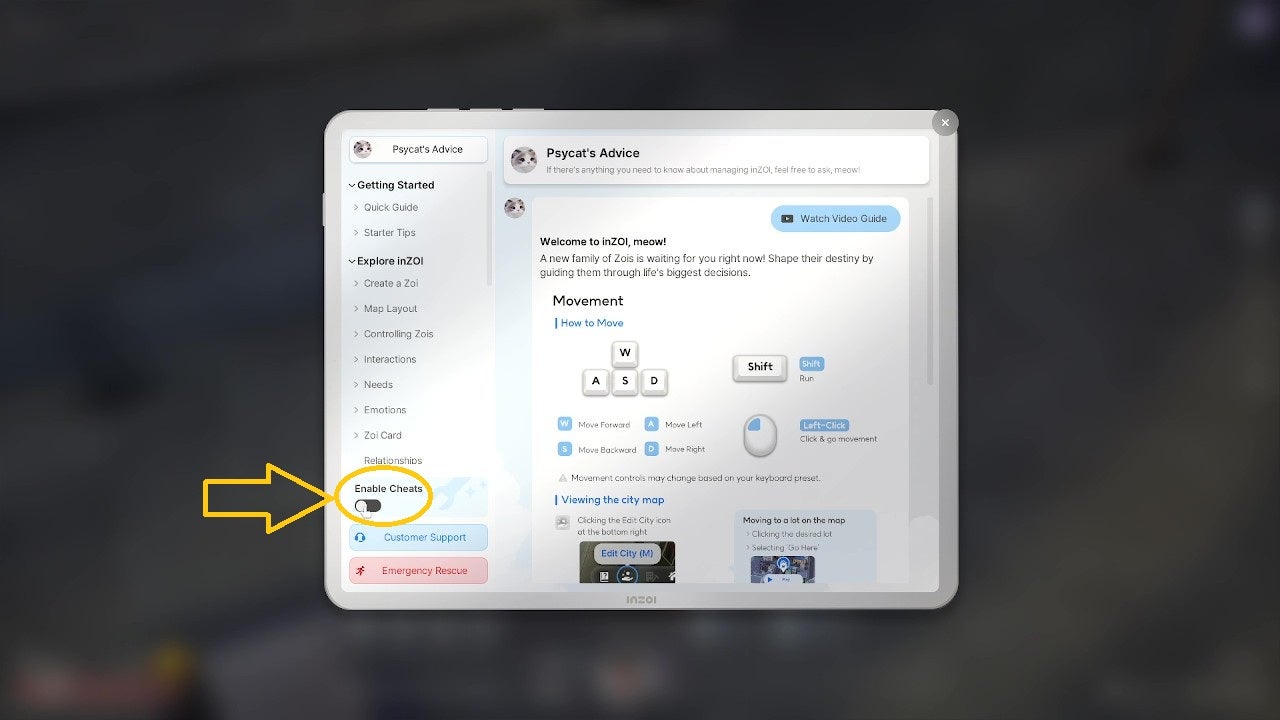
The Psycat menu has had a bit of an overhaul in Version 0.2.0, but cheats are still where they used to be — they just work very differently now. |Image credit:VG247 / inZOI Studio / Krafton
You can open inZOI’s cheats console with the classic Ctrl+Shift+C combo. inZOI’s take on the console is refreshingly modern, even featuring a neat little X-out button you can use to close it with one click.
Below are all of the new cheats now available for you to play with:
- inZOI money Cheats
- inZOI info cheats
- inZOI build cheats
- inZOI character cheats
- inZOI quality-of-life cheats
- What other cheats does inZOI have?
inZOI money Cheats
The golden rule of life sims is that 90% of the time people looking up cheats really just want the money cheat, so we’re not going to make you wait any longer:
| Cheat | Effect |
|---|---|
| addMoney [X] | Mew (inZOI’s world currency) equal to the specified amount is added to the active Zoi’s household funds. |
| addMeowCoin [X] | Purr Coins (reward store currency) equal to the specified amount are added to the active Zoi’s fund. |
Replace “X” with the amount of currency you want to add to the active Zoi’s funds.
inZOI info cheats
Many of inZOI’s cheats require you to know your Zois’ ID numbers and/or their current map co-ordinates in order to input them. Luckily, Zoi ID numbers are only five digits long and can be displayed continuously on the screen while you copy them into the cheat console.
| Cheat | Effect |
|---|---|
| showZoiInfo [true/false] | Toggles on a display above all visible Zois’ heads showing their ID and co-ordinates |
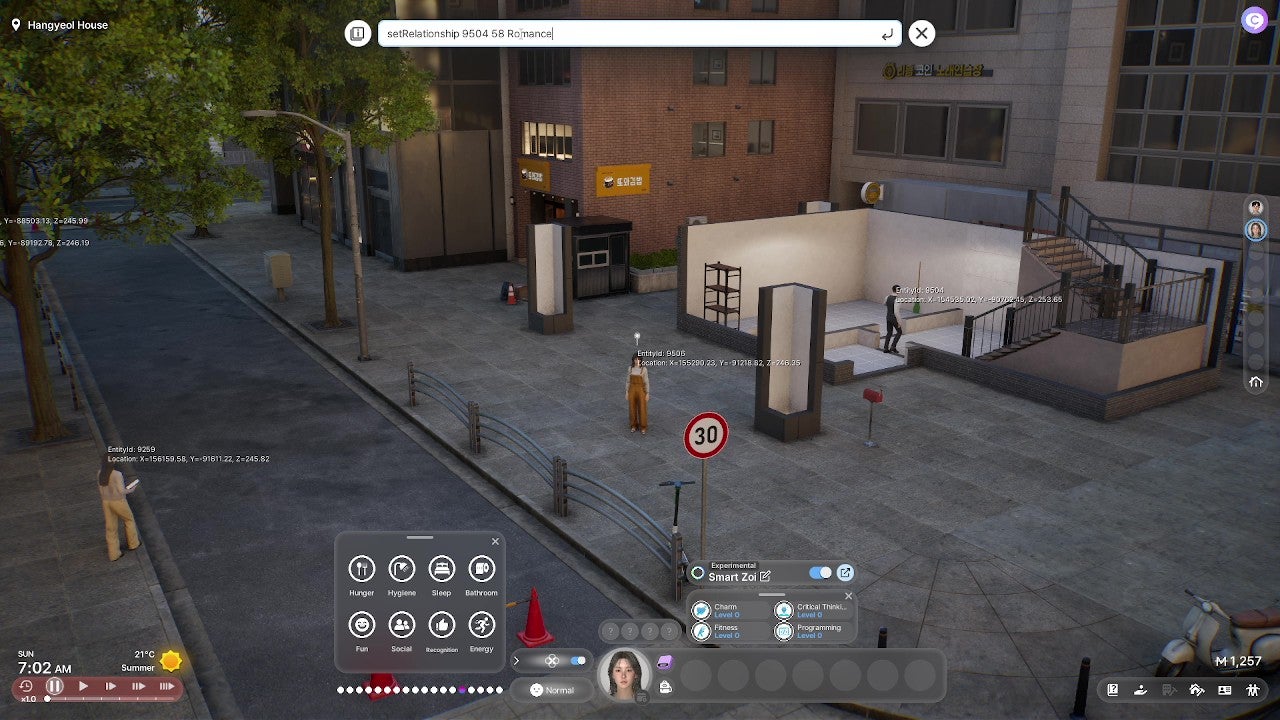
It’s nice and straightforward to cheat two Zois’ relationship, for example, when you can see their character ID right there on the screen until you dismiss it. |Image credit:VG247 / inZOI Studio / Krafton
inZOI build cheats
inZOI encourages you to play with its build tools when creating homes for your Zois, but these cheats allow you to edit other areas of the world with more freedom.
| Cheat | Effect | Notes |
|---|---|---|
| editAllSite [true/false] | Toggles editing on all properties, including public spaces like workplaces and parks. | Excludes roads and streets. Removing key items from workplaces etc. will cause them to cease functioning. |
| showStudioCategory [true/false] | Toggles studio objects being placeable on all property types. |
inZOI character cheats
For many players, life sims are all about storytelling, so being able to edit a Zoi’s circumstances in an instant can be really beneficial.
| Cheat | Effect | Notes |
|---|---|---|
| setNeedsFull [Need ID] | Maxes out specified need for the active Zoi, or all needs if no Need ID is specified. | Need IDs: Hunger / Cleanliness / Sleep / Toilet / Fun / Society / Admit / Energy |
| freezeAllNeeds [true/false] | Toggles Need depletion for the active Zoi. | |
| freezeAllNeedsSystem [true/false] | Toggles need depletion for all Zois. | |
| stopAging [true/false] | Toggles ageing for the active Zoi. | |
| immortalZoi [true/false] | Toggles the possibility of dying for all Zois. | |
| removeZoi [Zoi ID] | Instantly kills the specified Zoi. | Can only be used on Child Zois and older. |
| CustomZoi [Zoi ID] | Allows you to edit the specified Zoi’s appearance. | Can only be used on Child Zois and older. |
| getBabyWith [Zoi ID] | Causes the active Zoi to become pregnant by the specified Zoi. | Only works if the active Zoi is recognised as female the the specified Zoi is recognised as male, both are Young Adults or older, and the active household has fewer than eight members. |
| removePregnancy | Disables pregnancy for the active Zoi. | |
| helloMyAngel | If pregnant, the active Zoi will immediately give birth. | |
| setSkillLevel [skill ID] [level] | Sets the active Zoi’s specified skill to the level given. | Skill IDs: Charisma / Logic / Programming / Exercise / Art / Filming / Instruments / Cooking / Housework / Gardening / Speaking / Performance / CoffeeArt We’ll update this page soon with a list of toddler and child skill IDs! |
| addItemToBag [object ID] [quantity] | Adds the specified item to the active Zoi’s inventory in the amount named. | Enter a number from 1-100. We’ll update this page soon with a list of object IDs! |
| JobPromotion | Promotes the active Zoi by one level in their current career. | |
| addIllness [illness ID] | Inflicts the specified illness on the active Zoi. | Illness IDs: Disease_Cold / Disease_Sneezing / MotionSickness |
| cureIllness | Immediately removes all illnesses from the active Zoi. | |
| setRelationshipFull [Zoi ID] [relationship ID] | Maxes out the active Zoi’s specified relationship bar with the specified Zoi, or all relationship bars if none is specified. | Relationship IDs: Romance / Friendship / Business / Family |
| setRelationshipWorst [Zoi ID] [relationship ID] | Sets the active Zoi’s specified relationship bar with the specified Zoi to the lowest possible value, or all relationship bars if none is specified. | Relationship IDs: Romance / Friendship / Business / Family |
| setRelationship [Zoi ID] [value] [relationship ID] | Sets the active Zoi’s specified relationship bar with the specified Zoi to the given value, or all relationship bars if none is specified. | Relationship IDs: Romance / Friendship / Business / Family Enter a number from -100 to 100 |
| unlockProfile [Zoi ID] | Instantly unlocks all profile information for the specified Zoi in the active Zoi’s relationship panel. | |
| Obliviate | Resets all relationship logs for the active Zoi. | |
| hideCatEye [true/false] | Toggles the cat’s eye icon above the active Zoi’s head indicating that they are the character currently controlled by the player. |
inZOI quality-of-life cheats
Far more than just a “miscellaneous” category, quality-of-life cheats to take control of your Zois’ world on an even deeper level.
| Cheat | Effect | Note |
|---|---|---|
| teleport [region ID or coordinates] | Moves the active Zoi instantly to the designated location | Ctrl+T+LMB has a similar effect, moving the active Zoi to the location of the mouse click. We’ll update this page soon with a list of region IDs! |
| goHome | Instantly returns the active Zoi to their home lot | |
| timeSpeed [X] | Sets game speed | Enter a number from 1-30. |
| stopCleaning [true/false] | Toggles autonomous cleaning for all Zois. | |
| FreezeCleanliness [true/false] | Toggles dirt build-up across all properties, houses, and furniture. | |
| instantClean | Instantly cleans all properties, houses, and furniture belonging to the active Zoi. | |
| stopUtilitybills [true/false] | Toggles utility bills for all Zois. | |
| autoUtilitybills [true/false] | Toggles automatic payment of utility bills for all Zois. | |
| unlockDoor [true/false] | Toggles the active Zoi’s ability to bypass all doors that require permissions. | |
| changeSeason [season ID] | Changes the world weather to the specified season. | Season IDs: Spring / Summer / Fall / Winter |
| setSeasonLength [X] | Sets the duration of all seasons. | Enter any number; default value is 7. |
| controlWeather [weather ID][level] | Instantly enacts the specified weather type. | Weather IDs: Sun / Cloud / Rain / Snow |
| resetkarma | Resets Karma of all Zois. | |
| apocalypseTheWorld | Sets the city status to its lowest possible value, lowers Karma of all Zois to the lowest possible value, causes certain households to disappear. | Cannot be undone! Save your game before trying this! |
What other cheats does inZOI have?
In addition to the fully-fledged cheat codes outlined above, there are a couple of quality-of-life features in inZOI that could be considered akin to debug cheats, since they give you the option to circumvent the game’s usual rules a little bit if you need to.
The first can also be found in Psycat’s Advice, where it’s positioned just below the money cheat. The third button on the help list is red, features a symbol of a person running, and is labelled Emergency Rescue . Press it if your Zoi becomes stuck or trapped while pathfinding to save them the ignominy of public bladder failure because they got caught on a bit of scenery, or worse, starving to death while partway clipped through a wall.
<img loading=“lazy” src=“https://assetsio.gnwcdn.com/inzoi-how-to-use-emergency-rescue-example-image.jpg?width=2048&height=2048&fit=bounds&quality=85&format=jpg&auto=webp" onerror=“this.onerror=null;this.src=‘https://blogger.googleusercontent.com/img/a/AVvXsEhe7F7TRXHtjiKvHb5vS7DmnxvpHiDyoYyYvm1nHB3Qp2_w3BnM6A2eq4v7FYxCC9bfZt3a9vIMtAYEKUiaDQbHMg-ViyGmRIj39MLp0bGFfgfYw1Dc9q_H-T0wiTm3l0Uq42dETrN9eC8aGJ9_IORZsxST1AcLR7np1koOfcc7tnHa4S8Mwz_xD9d0=s16000';" alt=“The in-game help menu in inZOI, styled as “PsyCat’s Advice”, with a highlight indicating how to activate the emergency rescue “cheat” from the relevant button. - 6”>
Use this button to reset your Zoi to a less embarassing and/or potentially fatal location if they get stuck. |Image credit:VG247 / inZOI Studio / Krafton
The second feature is available only in Build Mode, and is simply the prompt to hold down the Alt button if you want to Freely place objects. Doing so removes the restrictions against overlapping objects, which may affect some functionality – and even in extreme cases result in the kind of situation that has you hitting that Emergency Rescue button – but gives you a lot more scope to make your decorating projects look good.
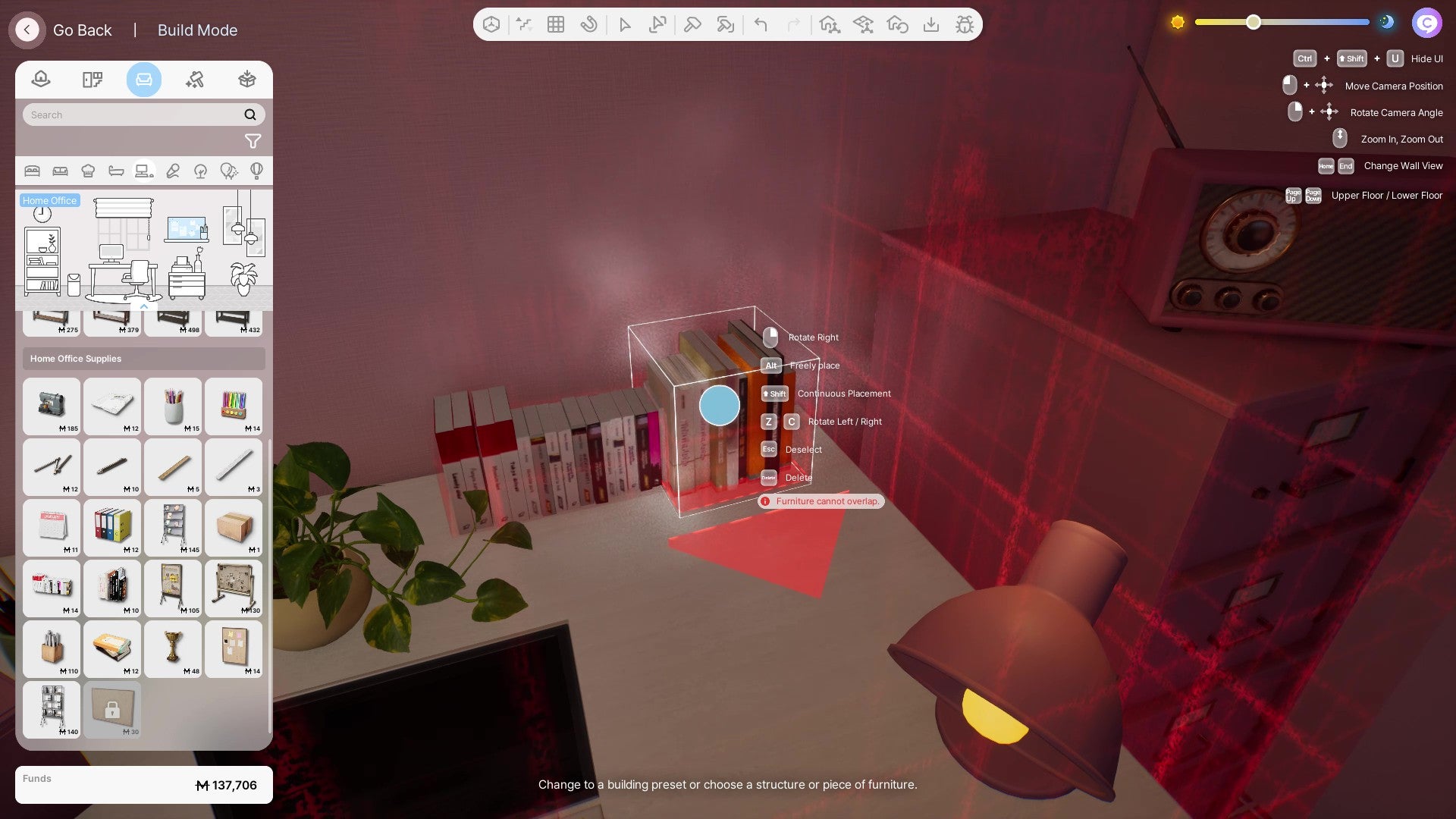
Stack your books without unsightly shelving gaps with the free-placement “cheat” in Build Mode. |Image credit:VG247 / inZOI Studio / Krafton
This prompt will be clearly visible on the list of options when picking up an object in Build Mode and so isn’t really “cheating” according to the game; but since it’s the corollary of a popular command cheat found across games in The Sims series, keen builders will surely be interested to know that it’s there.

inZOI
PC
Sign in and unlock a world of features


